Replication tuning
Tune replication for lower latency or reduced network costs.
Three settings control replication latency. The main decision is your transport layer — object store (S3, GCS, Azure Blob) is simplest and cheapest at rest, while NFS (EFS, Filestore, Azure Files, NetApp) removes per-operation costs and unlocks sub-second latency. Pick a transport, choose a profile below, and restart.
The three settings that matter
| Setting | Node | Default | What it does |
|---|---|---|---|
replication.primary.throttle.window.duration | Primary | 10000 (10s) | Maximum time before an incomplete WAL segment is flushed |
replication.replica.poll.interval | Replica | 1000 (1s) | How often the replica checks for new data |
cairo.wal.segment.rollover.size | Primary | 2097152 (2 MiB) | Max WAL segment size before rollover |
A segment is uploaded when either the size limit or the throttle window is reached, whichever comes first. Under heavy write load, segments fill and flush well before the throttle window expires. Under light load, the throttle window controls when the partially-filled segment is flushed.
Configuration profiles
Sub-200ms latency (NFS transport)
# Primary
cairo.wal.segment.rollover.size=262144
replication.primary.throttle.window.duration=50

# Replica
replication.replica.poll.interval=50
Sub-500ms latency (NFS or object store)
# Primary
cairo.wal.segment.rollover.size=524288
replication.primary.throttle.window.duration=100

# Replica
replication.replica.poll.interval=100
Default / balanced
No configuration needed. The defaults are:
replication.primary.throttle.window.duration=10000(10s)replication.replica.poll.interval=1000(1s)cairo.wal.segment.rollover.size=2097152(2 MiB)
Network efficiency
# Primary
cairo.wal.segment.rollover.size=2097152
replication.primary.throttle.window.duration=60000
Choosing a transport: cost vs latency
Object store (S3, GCS, Azure Blob)
- Per-request pricing: every WAL upload is a write op, every replica poll is a read op
- Lower latency settings = more ops = higher cost
- Best for: simplest setup, low storage cost, moderate latency tolerance
- Storage cost: ~$20/TB/month across major clouds
Replication over GCS has a latency floor of roughly 1 second. If you need sub-second replication on GCP, use an NFS transport such as Filestore or NetApp Volumes instead.
NFS / managed file storage (EFS, Filestore, Azure Files, NetApp)
- Fixed monthly cost regardless of how aggressively you tune
- No per-operation charges — poll every 50ms at no extra cost
- Best for: low-latency requirements, high-throughput ingestion
- Storage cost: ~$60–300/TB/month depending on service tier and provider
- NFS is usually priced by provisioned capacity, not usage — you pay for the full volume whether it's 10% or 100% full
The cost tradeoff
The storage cost gap (object store at ~$20/TB vs NFS at $60–300/TB) looks large, but the replication working set — WAL files in transit — is typically well under 1 TB. At that scale the per-TB premium is modest in absolute terms.
The real cost difference is operations. With object store, every flush and every poll is a billable request. Each actively-written table generates one write op per throttle window and one read op per poll interval. Across major clouds, write ops typically cost ~$5/million and read ops ~$0.40/million.
Object store ops cost per active table:
| Throttle / poll interval | Ops cost per table per month |
|---|---|
| 50ms / 50ms | ~$280 |
| 100ms / 100ms | ~$140 |
| 1s / 1s | ~$14 |
| 10s / 1s (default) | ~$2 |
Multiply by the number of tables being actively written to. With 10 tables at 100ms intervals, that's ~$1,400/month in API charges alone. With NFS, that same configuration costs nothing extra.
The rough breakeven:
ops cost per month ≈ active tables × $14,000 / interval_ms
If that exceeds the NFS premium over object storage (typically $40–180/TB/mo × your working set in TB), NFS is cheaper.
At default settings with a handful of tables, object store wins easily. Once you push below ~200ms intervals or have many actively-written tables, NFS pays for itself on API savings alone — and you get lower latency as a bonus.
For long-term data retention (cold/archive tier), object storage is always significantly cheaper and should be used regardless of your replication transport choice.
Summary
| Object store | NFS / file storage | |
|---|---|---|
| Pricing model | Per-request + per-GB stored | Fixed monthly (provisioned) |
| Storage cost | ~$20/TB/mo | ~$60–300/TB/mo |
| Cost of aggressive tuning | Higher (more ops) | No change |
| Setup complexity | Low | Medium (mount on all nodes) |
| Best for | Default settings, few tables | Sub-second latency, many tables |
How replication works
Understanding the data flow helps you tune effectively:
- Ingestion — Data is written to Write-Ahead Log (WAL) segments
- Upload — WAL segments are flushed to the transport (object store or NFS)
- Download — Replicas poll the transport and apply new WAL segments
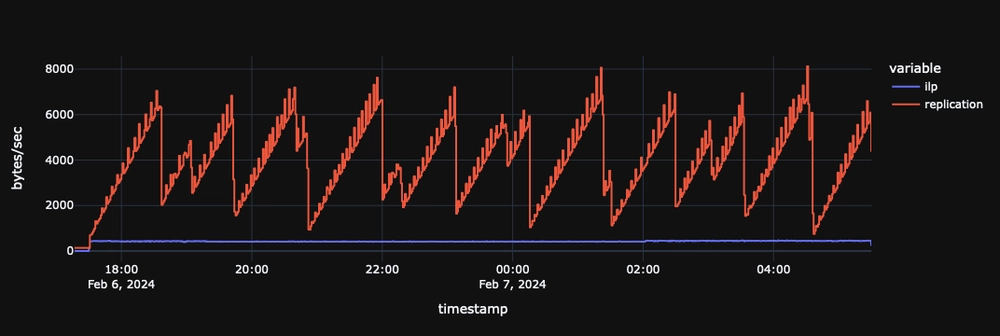
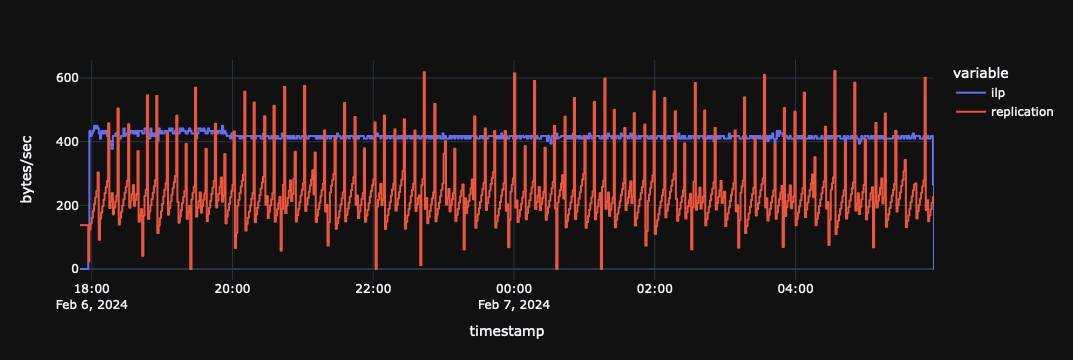
The key insight: smaller, more frequent uploads = lower latency but more network traffic. Larger, less frequent uploads = higher latency but lower costs.
Settings reference
WAL segment size
cairo.wal.segment.rollover.size=2097152
Controls the size threshold at which WAL segments are closed and uploaded. Smaller segments upload sooner (lower latency) but create more files. Works in tandem with the throttle window — whichever limit is hit first triggers the upload.
| Value | Behavior |
|---|---|
262144 (256 KiB) | Lower latency, but more network traffic. |
2097152 (2 MiB) | Higher latency, but less network traffic. |
Some object stores have minimum file size requirements. AWS S3 Intelligent Tiering requires files over 128 KiB.
Throttle window
replication.primary.throttle.window.duration=10000 # 10 seconds (default)
Maximum time before uploading an incomplete segment. If a segment hasn't reached the rollover size within this window, it is flushed anyway. Longer windows let segments fill up before upload, reducing redundant uploads (write amplification).
| Value | Behavior |
|---|---|
50 (50ms) | Ultra-low latency. Best with NFS transport. |
100 (100ms) | Low latency. Good balance for NFS transport. |
1000 (1s) | Low latency for object store transport. |
10000 (10s) | Default. Balanced. |
60000 (60s) | 1 minute delay OK. Fewer uploads. |
300000 (5 min) | Cost-sensitive. Batches more data. |
This is your maximum replication latency tolerance. QuestDB still actively manages replication to prevent backlogs during bursts.
Replica poll interval
replication.replica.poll.interval=1000 # 1 second (default)
How often the replica checks the transport layer for new data. This setting is configured on the replica node.
| Value | Behavior |
|---|---|
50 (50ms) | Ultra-low latency. Pair with aggressive primary settings. |
100 (100ms) | Low latency. Good for NFS transport. |
1000 (1s) | Default. Balanced. |
Reducing the poll interval below the throttle window duration has diminishing returns, since the replica cannot consume data faster than the primary produces it.
Advanced settings
These settings are available for power users but rarely need adjustment:
| Setting | Default | Description |
|---|---|---|
replication.primary.sequencer.part.txn.count | 5000 | Transactions per sequencer part file. Lower values mean smaller parts and faster incremental uploads but more storage requests. Fixed at table creation — cannot be changed for existing tables. |
replication.primary.compression.level | 1 | Zstd compression level for WAL uploads. Higher values reduce transfer size at the cost of CPU. |
replication.primary.compression.threads | 2 | Number of threads used for compressing WAL data before upload. |
replication.requests.max.concurrent | 32 | Maximum concurrent replication requests (uploads and downloads). |
replication.requests.retry.attempts | 3 | Number of retry attempts for failed replication requests. |
replication.requests.retry.interval | 500 | Milliseconds between retry attempts. |
Compression (reference)
WAL data is compressed before upload (the level and thread count are configurable in Advanced settings above). The typical ratios are useful for estimating storage and network requirements:
| Data type | Typical compression ratio |
|---|---|
| WAL segments | ~8x |
| Sequencer parts | ~6x |
For example, a 2 MiB WAL segment becomes ~256 KiB in the transport layer.
Next steps
- Replication overview - How replication works
- Setup guide - Configure replication
- Configuration reference - All server settings